Most of the time when I am using my admin bar, it's to manage the things I already have. Adding new things is something that only happens at the beginning of a project, and honestly I almost always get there from the listing page, not from the admin bar. (The only exception to this rule is the "Add content" link, which I use often)
I'd like to recommend that we move all the "Add new X" links to the bottom of the fly-out menu, instead of the top. This will also have the added benefit that as you are navigating to the "Add new X" button, you get a chance to browse all the existing Xs, and perhaps find the one you were about to create! (I'm not sure anyone else creates duplicate items often, but it happens to me more than I'd like to admit).
If you are in a hurry and don't want to do all the admin-bar scrolling, you can also click the top "List Xs" link, since that page will have the action link for "Add new X" on it :)
Before:
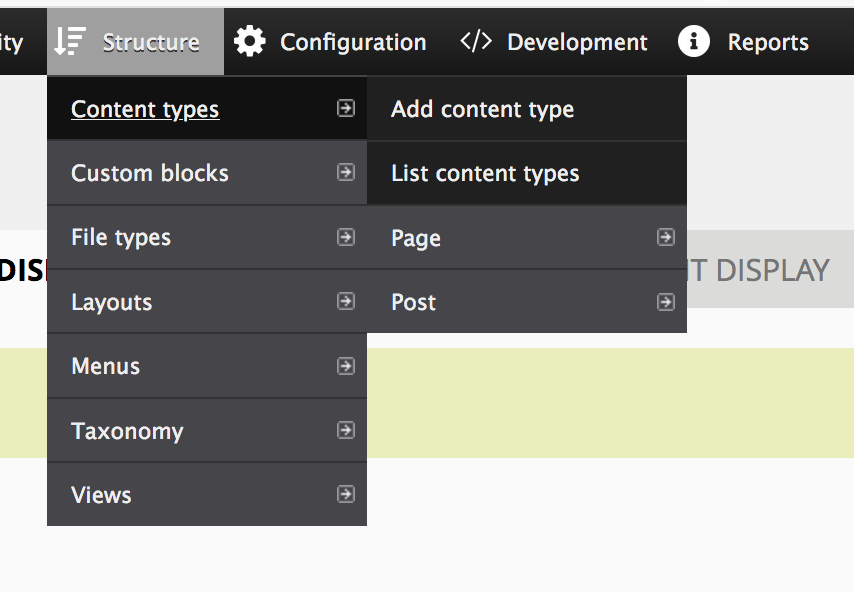

After:


Recent comments
Only if you select "Delete all content in these content types before generating new content."
Devel module deletes default images folder
I recently ran into the same error: Exception: The configuration directory in settings.php is specified as 'files/config_[some-random-CMI-ID-here]/active', but this...
Live deployment Configuration Directory error
https://github.com/shabib-m/tailwindcss/wiki
Free Backdrop Theme built on Tailwind CSS v3 (Based on Basis) - Seeking Feedback & Ideas!