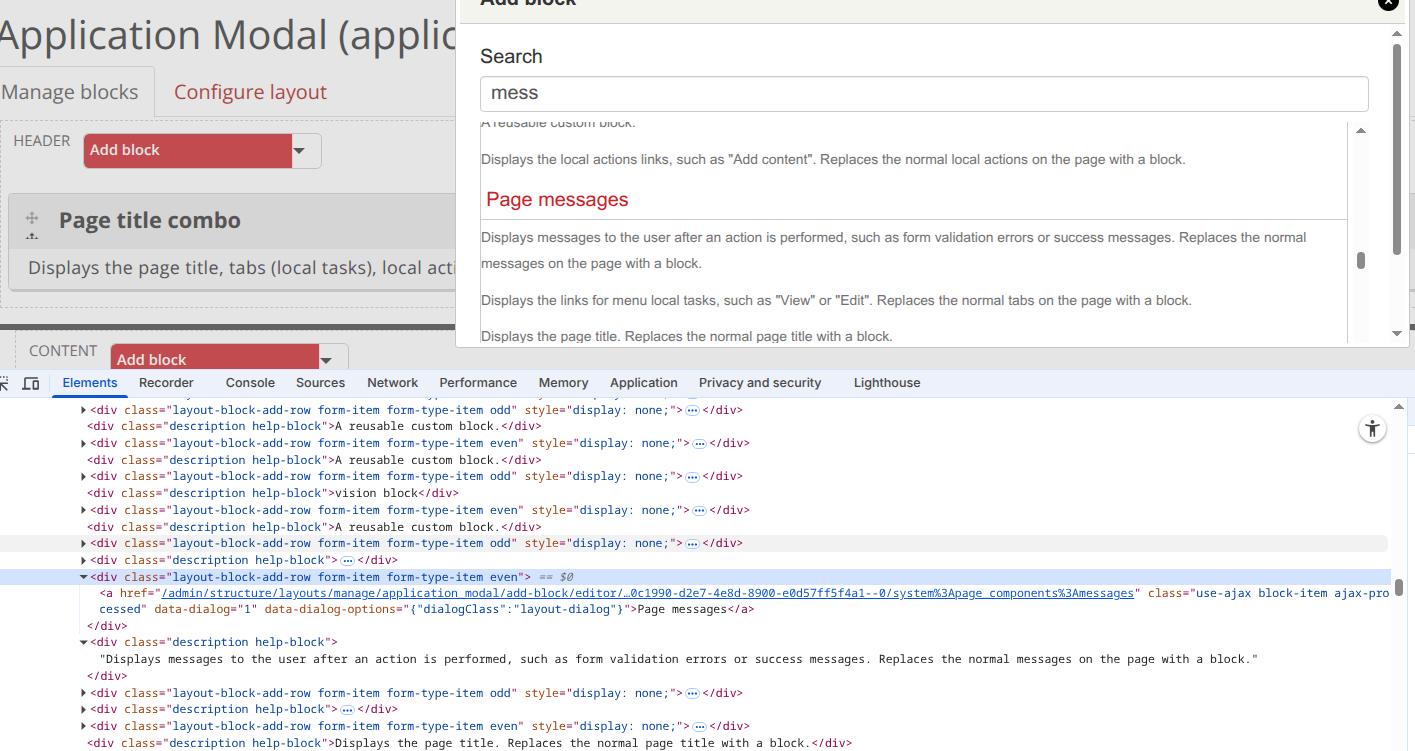
In the Layouts / Add block / 'type something area', I am getting the description help block being left over after the add row are hidden with the display:none.
Any clue why?
It sounds like a CSS/JS bug in the Layouts UI: when the "Add block" row is hidden with display:none, its help/description element isn’t being hidden together.
🔧 Things to try:
Inspect with browser dev tools → see which class/ID the leftover help block has.
Check if the hiding JS only applies to the row, not its child nodes.
It sounds like a small UI rendering or CSS conflict. The leftover description help block likely isn’t being hidden when the “Add block” row is set to display:none. Check if the help block has its own visibility or display rule that isn’t tied to the parent container — it may need a specific CSS selector or JS event to hide it. You can inspect the element in your browser’s dev tools to confirm which class remains visible, then either manually apply display:none to that element or update the JS toggle function to include the help block.
Hi folks,
I went ahead and ported all drush 8.x stuff to PHP 8.3 and completely ripped out the legacy Symfony 2 internals. You can check out the exact details of what was done in the PR...
The inability to check for and install updates makes website development and maintenance extremely difficult. Managing over ten websites across two different hosting providers—one of which is...
Thanks for the response, Herb!
Since I posted that I did some more testing and have posted this issue https://github.com/backdrop-contrib/tfa_basic/issues/33
In fact, if both email...

Comments
It is an admin theme that's based upon the bootstrap 3. Maybe it's missing a piece to act as an admin theme?
It sounds like a CSS/JS bug in the Layouts UI: when the "Add block" row is hidden with
display:none, its help/description element isn’t being hidden together.🔧 Things to try:
Inspect with browser dev tools → see which class/ID the leftover help block has.
Check if the hiding JS only applies to the row, not its child nodes.
Add CSS like:
.add-block-row[style*="display:none"] .help {
     display: none !important;
    }
If reproducible, this may be a Backdrop core/Layout module issue — worth filing in BackdropCMS issue queue.
It sounds like a small UI rendering or CSS conflict. The leftover description help block likely isn’t being hidden when the “Add block” row is set to
display:none. Check if the help block has its own visibility or display rule that isn’t tied to the parent container — it may need a specific CSS selector or JS event to hide it. You can inspect the element in your browser’s dev tools to confirm which class remains visible, then either manually applydisplay:noneto that element or update the JS toggle function to include the help block.