Hello everyone .
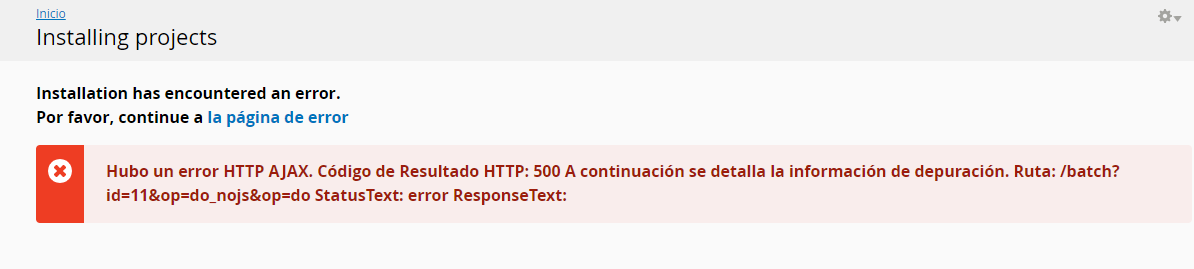
I have this error when wanting to install a module
Help please
There was an HTTP AJAX error. HTTP Result Code: 500 Below is the debugging information. Path: / batch? Id = 12 & op = do_nojs & op = do StatusText: error ResponseText:
I also don't have any answer for you at the moment, but can you please also let us know the following:
Were you able to install modules without any error before? If so, was there a recent update on the site (updated Backdrop core version) or the server (php version change)?
If you head to Configuration → Development → Logging and errors, and enable showing all errors, is there any additional error shown?
If you navigate to Reports → Recent log messages, are there any other errors you see? (I'd suggest to first clear all errors logged, then run a test module installation, then take note of any errors)
Well your second Idea seems to have done the trick!
So Simple!!!!! I can use this all over the place!!!
Big Hug, and Thanks a Million, @yorkshirepudding !!!
Posted5 hours 55 min ago by Francis Greaves (themetman) on:
Hi Francis. I can try to help. First things first, is your custom code that adds these files to your server telling Backdrop about them so they become managed files? That would be needed to do a...
Posted6 hours 7 min ago by Martin Price (yorkshirepudding) on:
Comments
@willowf - I do not have an answer for you right now. But, I think it would be helpful if you provide a little more information.
1) Is this only with one specific module or have you tried different modules and gotten the same results?
2) What is your hosting situation?
Thanks for answering.
It happens with all the modules that I want to install.
MY server is
PHP 7.4.15
memory_limit: 256M (Default)
max_execution_time: 30 (Default)
max_input_time: 600 (Default)
post_max_size: 256M (Default)
upload_max_filesize: 256M (Default)
Hello @willowf 👋
I also don't have any answer for you at the moment, but can you please also let us know the following: