In Short:
I need some HTML tags to work in CKEditor 5
I would be grateful if someone could help me, I've tried many things (see below) but can't get it to work.
The specific tags I need are "<ruby>" and "<rt>". These tags are used to add simplified Japanese characters above regular Kanji (so young readers who haven't memorized the Kanji yet can read them).
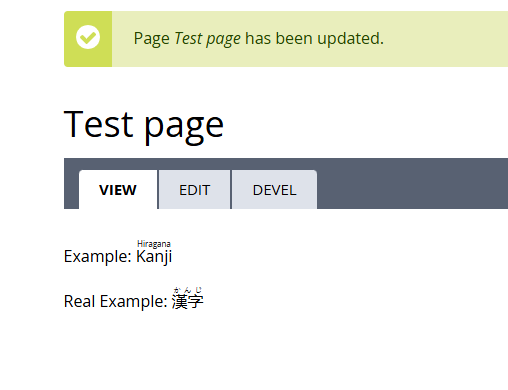
Example: <ruby>Kanji<rt>Hiragana</rt></ruby>
Real Example: <ruby>漢字<rt>かんじ</rt></ruby>
What I've tried.
1.)
Of course as the "Admin", the Admin has full permissions to use "Full HTML" (Configuration > Content authoring > Text editors and formats).
Just by giving "Full HTML" I would assume ANY HTML would be displayed in the Editor but... no. When viewing the Edit Page > CKEditor, the text is gone in regular mode but in "Source View" the tags are still there and when viewing the page the tags are working correctly as well.
2.)
"Full HTML" permissions to Admin and specifically selecting checking "Limit allowed HTML tags" and then adding "<ruby> and "<rt>" tags to the "Allowed HTML tags" input box.
After changing this setting and adding the tags, for some reason it actually REMOVED all the tags I had in there previously... ;( And it doesn't allow (strips them) when entered in "Source View"... this is so... confusing.
3.)
#1 and #2 didn't work so... had to call up my previous life coding experience. I added a function to one of my custom modules which in turn loaded a custom CKEditor 5 plugin.
I tried many versions of the js plugin... coulding get any to work.
Plugin:
Placed in,
C:\wamp\www\thedreamchest\core\modules\ckeditor5\js\plugins\backdrop-ruby\backdrop-ruby.js
js Code Start
===================
(function () {
'use strict';
const Plugin = window.CKEDITOR5.core.Plugin;
class AllowRuby extends Plugin {
static get requires() {
return [ window.CKEDITOR5.htmlSupport.GeneralHtmlSupport ];
}
init() {
const editor = this.editor;
const dataFilter = editor.plugins.get('DataFilter');
// Explicitly allow ruby and rt
dataFilter.allowElement('ruby');
dataFilter.allowElement('rt');
dataFilter.allowAttributes({
name: 'ruby',
attributes: true,
classes: true,
styles: true
});
dataFilter.allowAttributes({
name: 'rt',
attributes: true,
classes: true,
styles: true
});
}
}
window.CKEDITOR5.allowRuby = AllowRuby;
})();
===================
js Code End
===================
Module:
Placed in,
C:\wamp\www\thedreamchest\modules\bs_book\bs_book.module
// Trying to get Ruby tags to show up in the CKEditor 5
// Copied from:
// \core\modules\ckeditor5\ckeditor5.module
// Search: hook_library_info
function bs_book_library_info() {
$module_path = backdrop_get_path('module', 'ckeditor5');
$info = system_get_info('module', 'bs_book');
$libraries['backdrop.ckeditor5.ruby'] = array(
'title' => 'Allows Ruby Tags.',
'version' => $info['version'],
'js' => array(
$module_path . '/js/plugins/backdrop-ruby/backdrop-ruby.js' => array(),
),
//'css' => array(
// $module_path . '/css/ckeditor5-maximize.css' => array(),
//),
);
return $libraries;
}
// copied from:
// https://docs.backdropcms.org/api/backdrop/core%21modules%21ckeditor5%21c...
// OR (the actual file)
// \core\modules\ckeditor5\ckeditor5.module
// seach: ckeditor5_ckeditor5_plugins
function bs_book_ckeditor5_plugins() {
//$module_path = backdrop_get_path('module', 'ckeditor5');
//$image_prefix = $module_path . '/icons';
$plugins['ruby.Ruby'] = array(
'library' => array('bs_book', 'backdrop.ckeditor5.ruby'),
'config' => array(
'maximizeLabel' => t('Ruby'),
),
);
return $plugins;
}
Yes, you can use TinyMCE on some content and CKEditor5 in others. There is no problem having both enabled on a system.