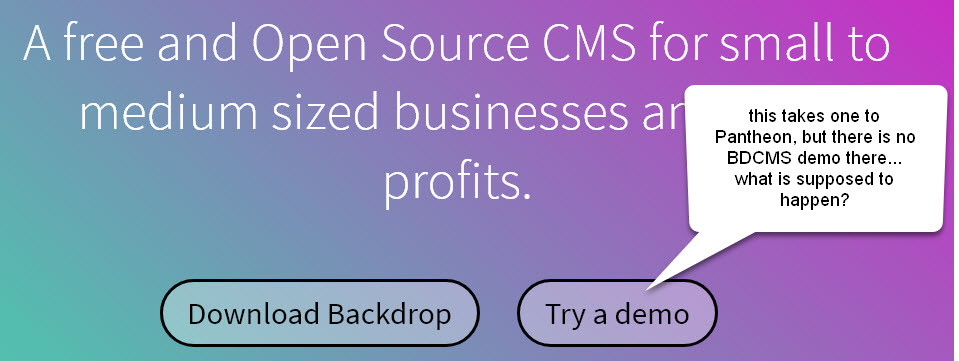
It links to Pantheon all right, but there is no indication of a BackdropCMS demo there. Is there a demo anywhere or do I have to set it up in my space and try to implement something?
ok... thanks... I'll do that and try again... you definitely need more instructions or disable the hotspot until you do... It's a turn-off and makes both of you look bad.
Thanks! Yes,
You can check out the dev branch on GitHub here: https://github.com/shabib-m/tailwindcss/tree/dev
Note: I’ve just pushed an update to the dev branch adding the Dark Mode...
Hi, so working through Amilenkov's useful suggestions in turn
unpublished? - I can see the page itself when not logged in. I did then edit and added a menu link from the page...
Amilenkov's suggestions are spot on. As for the greyed out Menu module, that's because there must be another module that depends on Menu. Core will gray out modules that cannot be disabled (e.g...
Posted1 day 9 hours ago by Alejandro Cremaschi (argiepiano) on:
Welcome to the Backdrop community!
My first suspicion would be access to the destination page. Backdrop checks access when building the menu, so a link can be enabled but still be hidden...
Posted1 day 17 hours ago by Antony Milenkov (amilenkov) on:

Comments
Were you logged into Pantheon?
It looks to me like you need to have an account at Pantheon and be logged in for this to work. The webpage should probably warn users of this.
This issue was discussed in a BackdropCMS.org issue a while back, but I don't think it was resolved.
https://github.com/backdrop-ops/backdropcms.org/issues/192
FYI - Once I logged into my Pantheon dashboard, this link works for me.
I create an issue for this:
https://github.com/backdrop-ops/backdropcms.org/issues/476
ok... thanks... I'll do that and try again... you definitely need more instructions or disable the hotspot until you do... It's a turn-off and makes both of you look bad.
FTR, the demo button now uses https://tugboat.qa and users do not need to be logged in.