Hi

It's been a while since I've been here so thanks again for a really good stable bit of kit.

However, I do have a minor problem. So, I'm thinking it might be how I've got the system set up.

 I'm creating a page  which uses numbered lists and when editing it the list levels are numbered 8(b)(iv) but when I saved it and looked at the page they are all numbers. So the example would be 8.2.4 where I'm using a "." to separate the levels.

See:

https://www.egtsc.co.uk/prone-some-of-the-things-i-do

I'm using CKEditor 5

Any pointers on how I can display on the page the same that I see when I'm editing?

Mike
Accepted answer

Hi Mike.

That looks like a bug. The CKE ordered lists when editing have the correct CSS to format those lists correctly, but when Backdrop displays the body field in Basis, it doesn't contain the css classes to format those. Would you be able to report this in the Backdrop core github issue queue?

 You can fix this by creating a few CSS rules, which you can include using the contrib CSS injector, or by coding it with backdrop_add_css() in an implementation of hook_node_view().

The CSS would look a bit like this for the normal body field of nodes.

  /* Level 1: Standard Numbers */
  .field-name-body ol { 
    list-style-type: decimal; 
  }

  /* Level 2: Lowercase Letters */
  .field-name-body ol ol { 
    list-style-type: lower-alpha; 
  }

  /* Level 3: Roman Numerals */
  .field-name-body ol ol ol { 
    list-style-type: lower-roman; 
  }

Comments

Hi Mike.

That looks like a bug. The CKE ordered lists when editing have the correct CSS to format those lists correctly, but when Backdrop displays the body field in Basis, it doesn't contain the css classes to format those. Would you be able to report this in the Backdrop core github issue queue?

 You can fix this by creating a few CSS rules, which you can include using the contrib CSS injector, or by coding it with backdrop_add_css() in an implementation of hook_node_view().

The CSS would look a bit like this for the normal body field of nodes.

  /* Level 1: Standard Numbers */
  .field-name-body ol { 
    list-style-type: decimal; 
  }

  /* Level 2: Lowercase Letters */
  .field-name-body ol ol { 
    list-style-type: lower-alpha; 
  }

  /* Level 3: Roman Numerals */
  .field-name-body ol ol ol { 
    list-style-type: lower-roman; 
  }

Hi

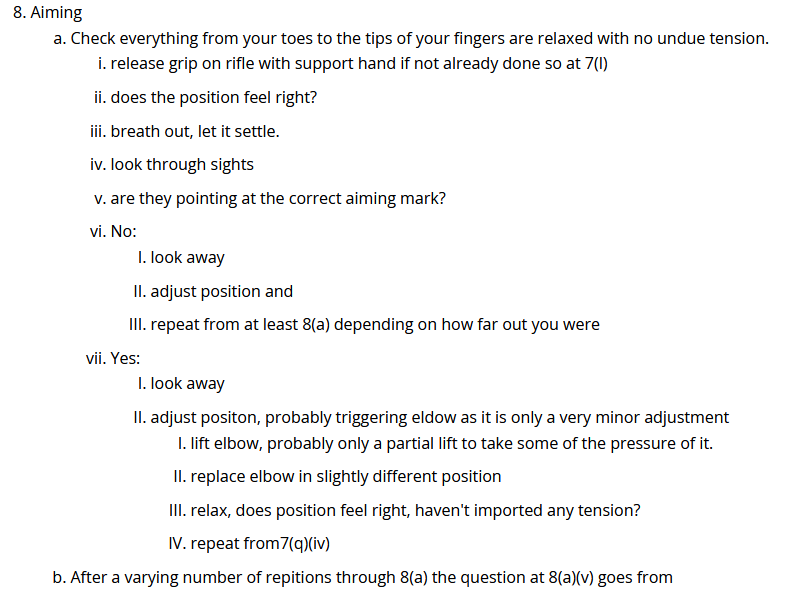
Editing I see this:

The CSS looks like this:


 /* Level 1: Standard Numbers */
 .field-name-body ol { 
   list-style-type: decimal; 
 }
 /* Level 2: Lowercase Letters */
 .field-name-body ol ol { 
   list-style-type: lower-alpha; 
 }
 /* Level 3: Roman Numerals */
 .field-name-body ol ol ol { 
   list-style-type: lower-roman; 
 }
 /* Level 4: Uppercase Letters */
 .field-name-body ol ol ol ol {
   list-style-type: upper-alpha;
 }
 /* Level 5: Roman Numerals */
 .field-name-body ol ol ol ol ol {
   list-style-type: upper-roman;
 }

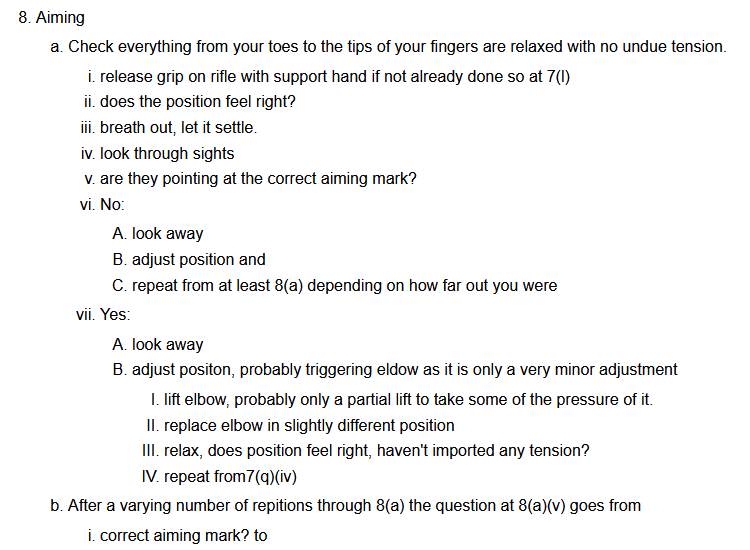
The display looks like this:

The two levels I've added based on guesswork from the higher level syntax are obviously not quite right.

KR
mike