I only have the one Backdrop site, but several others including phpBB  sites.

All have suffered massively recently (within the last 6 months or so) from AI  bots, crawlers and search engines that have flooded my servers.

In an attempt to mitigate this I popped several behind Cloudflare, and so far, afteer weeks of chatting to the Cloudflare AI and their Support Team, I have all of them working nicely... except for my Backdrop site!

I'm seeking advice from someone who has successfully run their Backdrop site from behind Cloudflare. I'd like advice on what my config should be and what Cloudflare features are necessary (I am on a Free plan at the moment). I'd also like advice on what my htaccess and iptables rules should be.  Don't want much do I? :) 

I'm starting to distrust their AI's suggestions - their latest fix to the issue I was working on seems to have resulted in an Access Denied message - but only for one specific page address. Working together we determined it is most likely not a Cloudflare issue but a Backdrop issue.

Here's the very last piece of advice I got ...

After fixing (I thought) access issues to admin.toysnz.com yesterday - I find I am receiving an "access denied - you are not authorized to access this page" message when trying to access https://admin.toysnz.com/admin/reports/updates.

This page is within the admin section of the site where all updates, editing, etc occurs.

What is causing this?


################################################################
Cloudflare AI finally responded after 2 hours of back and forth:
----------------------------------------------------------------

Cloudflare is not blocking these requests. The "Access Denied" is being generated by Backdrop CMS itself.
What's happening in Backdrop CMS

The pattern you're describing is a classic Backdrop/Drupal permission issue:

   /admin/reports/updates → Access Denied (this route checks administer site configuration permission)
   /admin/reports/updates?check=1 → Works (the ?check=1 parameter triggers a different code path)
   /admin/reports/updates/list → Works (different access callback)
   Cron runs from dashboard → Logs show completion but no UI feedback

Likely causes

   Corrupted session — your admin session may have a stale CSRF token or permission cache. Try:
       Log out completely, clear cookies for admin.toysnz.com, log back in
       Or run drush cc all (or the Backdrop equivalent) from the server CLI

   Stale permission cache — Backdrop caches user permissions. After the server power cycle, the cache may be inconsistent:

   # From the Backdrop site root on your server
   drush cc all
   # Or if drush isn't available:
   drush cc perm

   Module issue — the Update Status module may have a corrupted state. Try:

   drush pm-disable update; drush pm-enable update

   Database session table — after the unexpected shutdown, the sessions table may have corrupted entries:

   TRUNCATE TABLE sessions;

   (This will log everyone out — you'll need to log back in.)

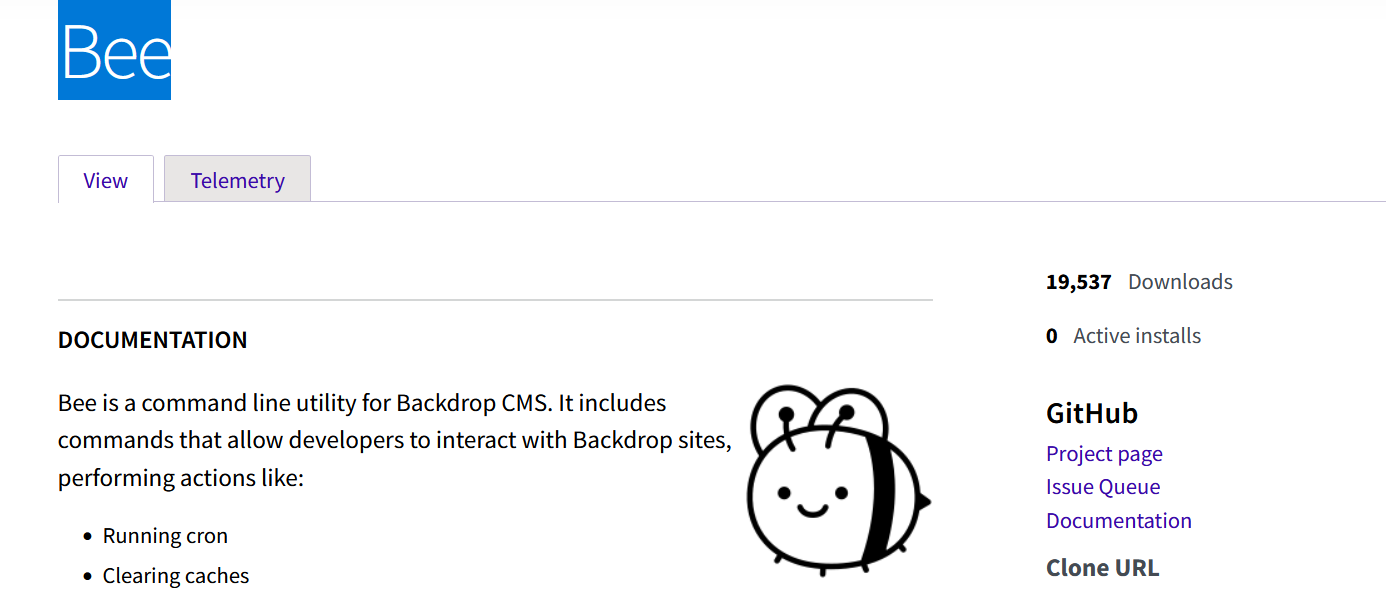
I pointed out I didn't have Drush and hadn't used it since switching to Backdrop CMS  - AI then suggested I install Bee then "bee cc all" or clear the caches from mysql. Since Bee doesn't seem to have any active sites using it - I wonder if that is a viable option?

the mysql command suggested is :

mysql -u [db_user] -p [db_name] -e "TRUNCATE TABLE cache; TRUNCATE TABLE cache_bootstrap; TRUNCATE TABLE cache_filter; TRUNCATE TABLE 

cache_menu; TRUNCATE TABLE cache_page; TRUNCATE TABLE cache_path;"
Accepted answer

@ian Let's try to stay on the rails here. As the project page, https://backdropcms.org/project/bee, says: "Bee is a command line utility for Backdrop CMS." It is equivalent to drush. It is not installed as a module and does not show as actively installed. Also, the telemetry is notorious for reflecting lower numbers than actual usage. You do not need to use bee if you are comfortable with clearing caches in the UI. Bee is a handy tool for a number of tasks, just like drush is for Drupal.

As for Cloudflare, I am sorry I cannot assist you since I gave up on it. I did have it working with Backdrop.


Most helpful answers

Since Bee doesn't seem to have any active sites using it - I wonder if that is a viable option?

What do you mean by that? Loads of sites use it but it is not a module, rather it is a tool that can be installed before Backdrop, can be used to install Backdrop and a single install can manage all the Backdrop sites on a single server.

Because it is not a module, it doesn't appear in the usage stats but we do have telemetry that offers a partial picture:

https://backdropcms.org/project/bee/telemetry

If a site doesn't have any bee commands run on it for a few weeks then that site drops from the telemetry, so the actual number that actually have bee is higher.

I'm not using Cloudflare so can't help with that, but if you are using user 1 (i.e. the admin user created when you install Backdrop) then you should not experience access denied.  Is it a Backdrop themed 403 or a plain server delivered 403?


Comments

My "unexpected shutdown" turned out to be my VPS Host replacing the kernal - they shutdown then restarted the server.

Since Bee doesn't seem to have any active sites using it - I wonder if that is a viable option?

What do you mean by that? Loads of sites use it but it is not a module, rather it is a tool that can be installed before Backdrop, can be used to install Backdrop and a single install can manage all the Backdrop sites on a single server.

Because it is not a module, it doesn't appear in the usage stats but we do have telemetry that offers a partial picture:

https://backdropcms.org/project/bee/telemetry

If a site doesn't have any bee commands run on it for a few weeks then that site drops from the telemetry, so the actual number that actually have bee is higher.

I'm not using Cloudflare so can't help with that, but if you are using user 1 (i.e. the admin user created when you install Backdrop) then you should not experience access denied.  Is it a Backdrop themed 403 or a plain server delivered 403?


Now, now calm down! :)

I based my statement "Since Bee doesn't seem to have any active sites using it - I wonder if that is a viable option?" on the following:

Note active installs...

"Is it a Backdrop themed 403 or a plain server delivered 403?

@ian Let's try to stay on the rails here. As the project page, https://backdropcms.org/project/bee, says: "Bee is a command line utility for Backdrop CMS." It is equivalent to drush. It is not installed as a module and does not show as actively installed. Also, the telemetry is notorious for reflecting lower numbers than actual usage. You do not need to use bee if you are comfortable with clearing caches in the UI. Bee is a handy tool for a number of tasks, just like drush is for Drupal.

As for Cloudflare, I am sorry I cannot assist you since I gave up on it. I did have it working with Backdrop.


My thanks to you both... I understand now that Bee is not a module but a stand alone utility.

I've installed it and see that it is similar to Drush which I have used before. I'll now experiment with clearing caches and running cron to see if that helps.

I'm only using Cloudflare to reduce the impact on my site of the AI and other bots, scrapers, and search engines that have driven my bandwidth to excessive limits. I'll continue to assess if its a lost cause or not.

Since this is still possibly Cloudflare related I'll post here:

I'm now experiencing what I think is caching issue - since installing Bee I've run bee cc all, bee cron, bee mm 1,  then, while in backdrop/modules/contrib, downloaded a module that has been updated, moved the old directory to ../../, unzipped it,  run bee cc all, bee cron, bee mm 0, and checked UI to see what it says.

I did all this because it won't update in the UI, yet yesterday I updated to v1.x-1.6 from the UI with no problems.

However in the UI it still says I'm running 1.x-1.6.0, that the newest version is 1.x-1.7.0, and the facility to update system does not appear to be there. 

I'm also now getting a 403 when trying to access admin/reports/updates - it seems to be Backdrop generated but there is nothing in the Recent Log messages other than my login as admin....


@ian I am getting lost what module are you using that is version 1.x-1.6.0 and 1.x-1.7.0 ?

Sorry - it is the field_group module.

However, last night I switched off proxying to the site and proved to Cloudflare Support that it was NOT a Backdrop issue. After a thorough examination of the site and putting it into Development mode, they decided it was, in fact, a Cloudflare Edge rule that was the issue. This was a caching rule developed by their AI  and implemented on this site only. Once that was fixed (around midnight NZST) the site again operates as it should. It appears the Rule meant Cloudflare was serving up cached versions of the login page with outdated data that resulted in a 403.

I think this thread can be marked [SOLVED]...